






How to Add Employees - Staff & Admins Settings
Learn how to successfully add new employees to your Bottle POS and to set their security permissions

 October 01, 2024
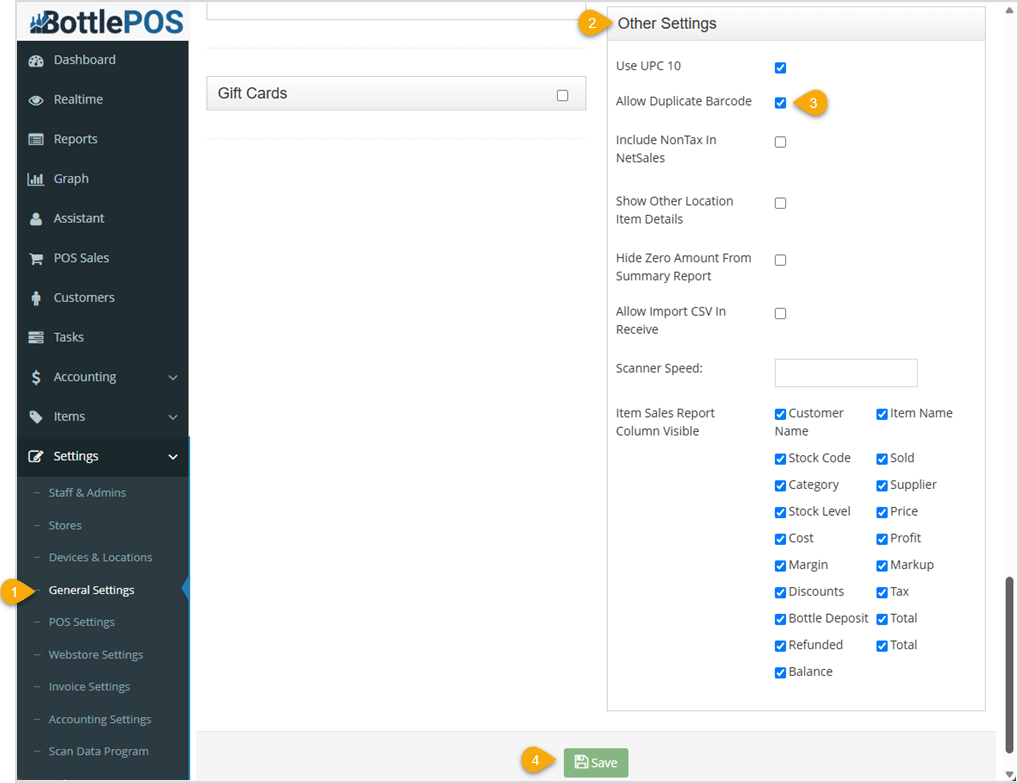
Learn how to enable multiple items in your inventory to use the same barcode. This feature is turned off by default so that barcodes cannot be duplicated. You may want to allow barcode sharing if it's possible some of your inventory might use the same stockcodes. This may occur with non-serialized inventory, if manufacturers use the same barcodes for seasonal items resulting in multiple variants of the same thing, or as a result of Bottle POS converting UPCs into a 10-digit UPC-A format (which can sometimes result in duplicated barcodes between variations of the same product).
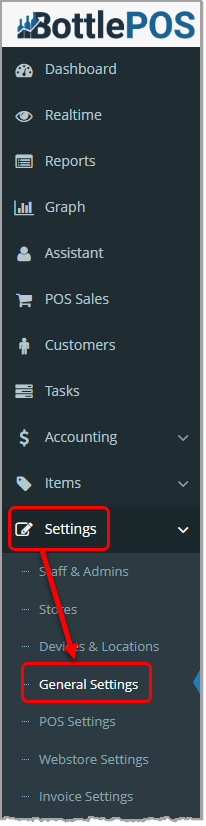
To turn on barcode sharing, click General Settings in the Settings menu of your Admin system. Admin privileges are required to complete the steps in this article.
Q: Can I limit the duplication of barcodes to only certain items?
A: No. Duplicate barcodes are available for all or no inventory.
Q: I have a question, but I can't find my answer here, how do I get more assistance?
A: You can ask any question at the number below. Contact our 24/7 support team at: (877) 381-4087
Is this page helpful?
×Help us improve our articles