Deleting Transactions

October 01, 2024
You are able to delete transactions entirely from the system if needed. Deletions are permanent, so use this feature with care!
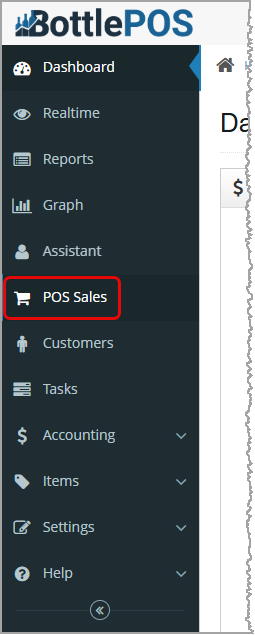
You can get to this area by logging into your Bottle POS Admin and clicking on POS Sales on the left.
Deleting Transactions
Please Note: Once a transaction is deleted, it will be removed from the database and cannot be retrieved. The delete action cannot be undone.
Deleting Transactions One at a Time
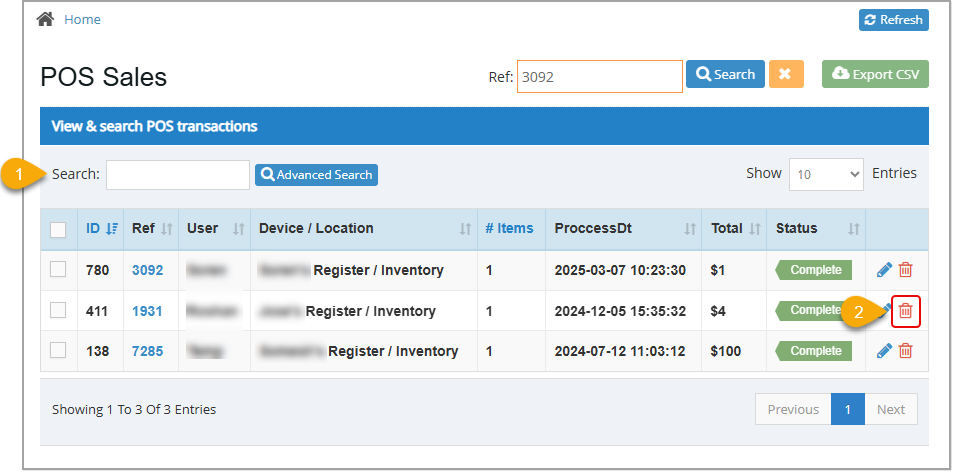
- Search for the transaction you want to void using either Ref Search at the top (you can use the last few digits in the Ref ID), the Search just above the data table (you can search by any number, name, date, or amount), or you can use the Advanced Search using any information you might have about the transaction.
- Click the Trashcan icon for the transaction you want, as shown in the following image.
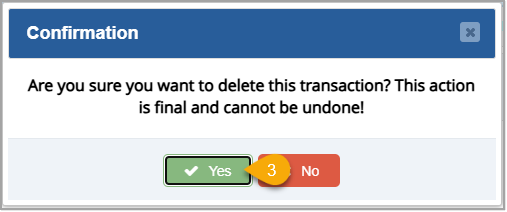
- Click Yes on the confirmation message if you truly want it permanently removed.
Deleting Multiple Transactions At Once
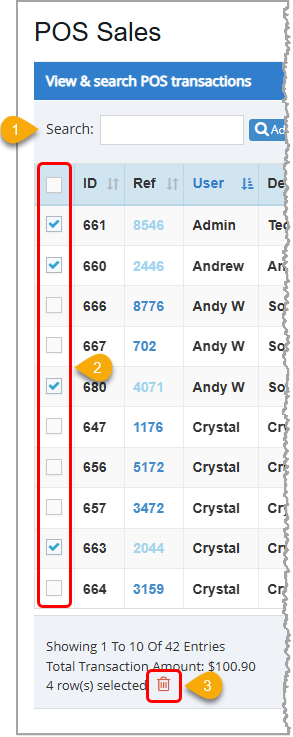
- Search for the transactions you wish to delete.
- Select the check boxes in the left table column for each transaction you're wanting to delete. If you want to delete all of the transactions on the current page, you can click the checkbox at the top of the Checkboxes column to Select All. Below the table, you'll see the total number of selected rows, the total dollar value of the selected rows, and the Trashcan icon.
- Click the Trashcan icon, then click Yes on the confirmation message that will pop up.
Related Topics
How to Find Transactions
Working With Transaction Details in the Admin
Frequently Asked Questions
Q: If I have accidentally deleted a transaction, how can I get it back?
A: Unfortunately, once it's removed from the database, there is no way to get a transaction back, so pay careful attention to the confirmation prompts and make sure you really want to delete something before clicking Yes.
Q: I have a question, but I can't find my answer here, how do I get more assistance?
A: You can ask any question at the number below. Contact our 24/7 support team at: (877) 381-4087
Your Admin Dashboard is your hub for keeping your finger on the pulse of your business. Take a look
Your Admin Realtime page gives you a live view of your sales as they come in and has some useful uti
The Reports in the Bottle POS Admin can show you details about all of your data, however you need to








Is this page helpful?
×Help us improve our articles