







Managing Timesheet Entries
It's common for employees to forget to clock in or out and when that happens you need an easy option

 October 01, 2024
Use this article to learn how to print labels from the Admin app. Working from the Admin portal instead of through the POS app allows you to print labels for more than one item at a time regardless of your physical location (register or back office).
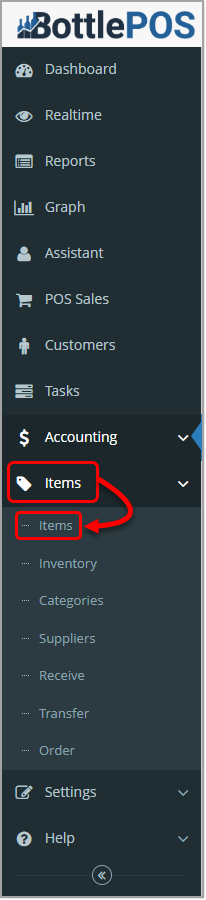
To access your inventory and print labels in Admin, click Items in the Items menu. Admin privileges are required to complete the steps in this article.
Before you can print a label for an item, the following must be true.
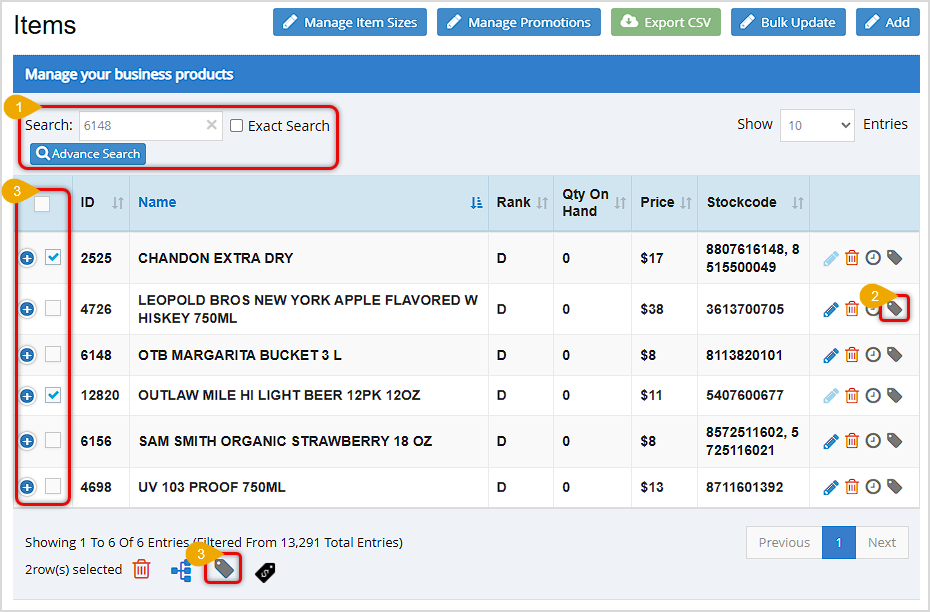
 on the far right of that item's row.
 The system will send the print job immediately to your label printer. To print multiple copies, click the Label Icon as many times as you need labels (for example, click it 3 times for 3 labels).
How to Print Labels from the POS
Q: Can I multiple labels at one time for one item like I can in the POS?
A: No. One label prints each time you click the label icon . To print multiple labels click the icon multiple times.
Q: I have a question, but I can't find my answer here, how do I get more assistance?
A: You can ask any question at the number below. Contact our 24/7 support team at: (877) 381-4087
Is this page helpful?
×Help us improve our articles