






Getting Started with Your POS
Welcome to Bottle POS! This article covers some things you'll need to configure in the Admin before

 February 26, 2026
This video will show you how to add and work with your suppliers. Take a look!
Q: Can I set the Supplier in the Register?
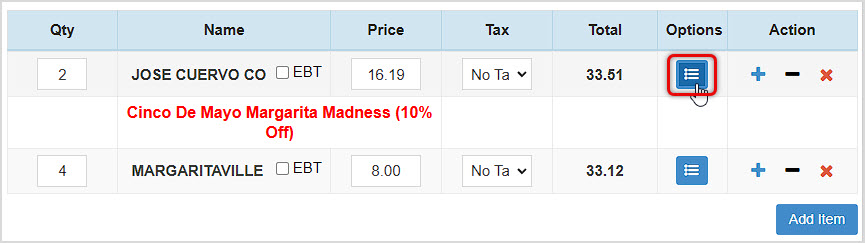
A: Yes! After you load the item into the Register, click its Options button to open the Edit Item window and you can click to set the Supplier, then click Update to save the change. The POS will pop up a confirmation that the item was updated.
Q: What field do I use to store my account number for my supplier?
A: We recommend using the "Notes" field in the Add / Edit Supplier window for any extra information you wish to store.
Q: Do I need to use Suppliers in my Bottle POS?
A: Suppliers are not required for use in your Bottle POS, though it is extremely important for proper inventory ordering and tracking.
Q: How many suppliers can I add to my Bottle POS?
A: There is no limit to the number of suppliers you can add to your Bottle POS.
Q: I have a question, but I can't find my answer here, how do I get more assistance?
A: You can ask any question at the number below. Contact our 24/7 support team at: (877) 381-4087
Is this page helpful?
×Help us improve our articles