Seller Report

October 01, 2024
This report shows the total Sales, Voids, Refunds, and Balance for each User that logged into this register during the current shift.
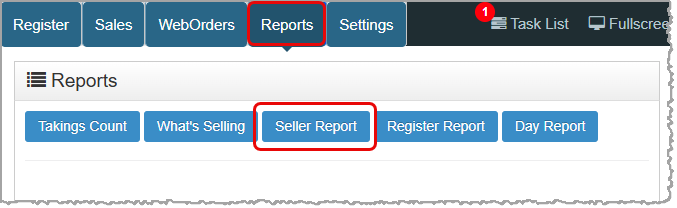
To get to this report, log into your Point of Sale app and go to Reports > Seller Report.
Working With the Seller Report
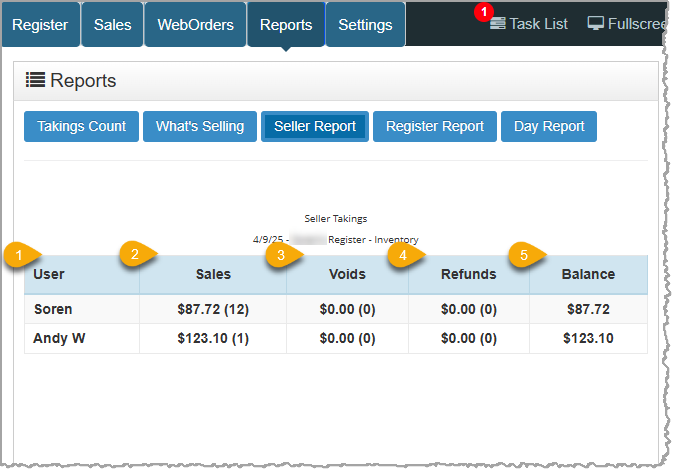
- User - This column displays the Username of each staff member who completed transactions in the register during the current shift.
- Sales - This column displays the total dollar amount the user collected during the current shift in the register. The number of transactions displays in parentheses immediately after the dollar amount. For example, if Barb took in $500 across 10 sales you would see $500.00 (10) in this column.
- Voids - This column displays the total dollar amount of sales completed by the user that were voided during the current shift on this register. The number of voided transactions displays in parentheses immediately after the dollar amount. For example, if Barb voided one $130 sale you would see $130.00 (1) in this column.
- Refunds - This column displays the total dollar amount of refunds the user paid out of this register during the current shift. The number of refunded sales displays in parentheses immediately after the dollar amount. For example, if Barb refunded one $20 sale you would see $20.00 (1) in this column.
- Balance - This column displays the amount the store gained for each user after voids and refunds. (Sales - (Voids + Refunds) = Balance) Using the examples above, Barb’s Balance would be $350.00 ($500 - ($130 + $20)).
Related Topics
Guide to the POS Reports
Takings Count Report
What’s Selling Report
Register Report
Day Report (POS)
Closing Drawer Count
Frequently Asked Questions
Q: I have a question, but I can't find my answer here, how do I get more assistance?
A: You can ask any question at the number below. Contact our 24/7 support team at: (877) 381-4087
The Reports in the Bottle POS Register App can show you details about current sales such as totals a
This article will cover how you can find transactions, something you'll likely need to do from time
The Bottle POS offers a variety of ways you can work with the details of your completed transaction.








Is this page helpful?
×Help us improve our articles